Our Thursday, January 26, 2017 server party was organized around a commitment by David Dodgson aka ELT Sandbox to meet us at his mountain retreat in Minecraft and talk about EVO Minecraft MOOC. In the end we were taken on tours of the mines under the retreat, the mob-spawning tower created by David Plumel, and the village protected by Dakota Redstone so he could have trading partners to supply him with emeralds.
David Dodgson was one of our original EVO Minecraft MOOC moderators.
He was having trouble getting on the Minecraft server from Bahrain but he agreed to try and connect by 1900 UTC on Thu Jan 26, and with luck, it worked. I streamed it on this watch page: https://youtu.be/F9u6Is4PJ04
The event was attended by Rose Bard, David Dodgson, Linda Gielen, Maha Abdelmoneim, Jeff Kuhn, Jo Kay, David Plumel, Dakota Redstone, Christophe Menard, in addition to myself (and if I left anyone out, let me know, and I’ll rectify the oversight here).
Wed Jan 25 streaming on-the-fly Rose Bard takes us on a tour of her mob farm in-progress
This took place after I had posted the following, and a bunch of us hooked up on the EVO Minecraft MOOC server
We visited David Plumel’s very elaborate mob farm in his castle keep with +Linda Gielen, but we didn’t record it. Meanwhile +Rose Bard invited me to see the mob farm she was making beneath her house.
She was using Discord, so we decided to stream the tour, and you can see it here, https://youtu.be/lIhF27OSqBE and in the embed above.
Earlier this week
Sat Jan 21 1500 UTC Learning2gether 358 – Special streaming from Minecraft and Discord
Sat Jan 21 1700 UTC Peggy George and Kim Thomas on Classroom 2.0 – Charge up your PLN
Saturday, January 21, 2017
“Charge up your PLN! A Credit Card with No Expiration Date!”
Presenters: Peggy George and Kim ThomasIn these times of severe budget cuts and compelling needs for meaningful professional development for teachers, we need high quality, no-cost/low-cost alternatives. They must be flexible and support teachers who are eager to take charge of their own learning in relevant, meaningful ways at times that work for them (“PD on Demand”). Claim your “Super Hero Credit Card” and learn about how to build your PLN through fantastic resources for free, online webinars, virtual conferences, Twitter, Pinterest, Periscope, blogs, Livebinders, and much more. Charge Up Your Super Powers by Charging Up Your PLN!In this webinar Peggy and Kim will share a Livebinder full of resources to help you build your own professional learning network through participation in and collaboration with many free, virtual learning opportunities.
Take a guided tour of specific free conferences, webinars and resources available for global educators and receive an introduction to Livebinders as a powerful tool for curating and sharing resources
Receive tips and resources for tools that will support your learning and sharing including Twitter, Pinterest, Periscope, Blab, blogs and more
Takeaway: access to the entire Livebinder of curated PD resources to fully explore following the session.
Dr. Peggy George is a retired educator who lives in Phoenix, Arizona, and has been a professional educator for over 50 years with many roles including principal, teacher, special education director and university pre-service teacher education instructor at ASU-W. She hosts the weekly Classroom 2.0 LIVE webinars, is a STAR Discovery Educator and member of the K12 Online Conference Organizer Team. She is an Organizer for EdCampPhoenix and a regular volunteer moderator in the virtual conferences hosted by Steve Hargadon via the Learning Revolution.
Kim Thomas is the Technology Integration Specialist in the Madison School District in Phoenix, AZ. For 16 years she has been fortunate enough to be able to follow her passion of working with teachers and students in finding fun and interesting ways to integrate technology. She is also an Organizer for EdCampPhoenix and a STAR Discovery Educator. Prior to this position Kim was a 4th-6th grade teacher in the Glendale Elementary School District.
Remember to follow us on Twitter: #liveclass20
More information and session details are at http://live.classroom20.com. If you’re new to the Classroom 2.0 LIVE! show you might want to spend a few minutes viewing the screencast on the homepage to learn how we use Blackboard Collaborate, and navigate the site. Each show begins at 12pm EST (Time Zone Conversion) and may be accessed in Blackboard Collaborate directly using the following Classroom 2.0 LIVE! link at http://tinyurl.com/cr20live. All webinars are closed captioned.
On the Classroom 2.0 LIVE! site (http://live.classroom20.com) you’ll find the recordings and Livebinder from our recent “Imagineering Your Classroom: 21 Disney Projects and Applications to Engage Students” session with Dr. Howie DiBlasi. Click on the Archives and Resources tab.
Classroom 2.0 LIVE Team: Peggy George, Lorie Moffat, Tammy Moore, Paula Naugle, Steve Hargadon
Mon Jan 23 2000 UTC – Nik Peachey, Thinking Critically Through Digital Media, an ICT4ELT EVO 2017 event
Week 3 Live Session
Nik Peachey
Thinking Critically Through Digital Media
In this session Nik will look at a range of tools and resources to encourage students to look at web based information in a more critical way.
On Saturday, January 21, 2017, at 1500 UTC, Learning2gether delivered a special treat by streaming an EVO Minecraft MOOC Server Party and Tour from Minecraft in-world using Discord for voice.
Members of the #evomc17 Google+ Community, who had filled out the registration form and become whitelisted on our server, could join us in-world. But anyone could watch us on YouTube, at https://youtu.be/qwSLAzbwOcY, and interact with us in real time at our text chat space at http://chatwing.com/vancestev
Tour guides who had indicated they’d be there included Rose Bard, Linda Gielen, Maha Abdelmoneim, Jane Chien, and Vance Stevens. All were welcome to participate in Minecraft live or in the stream, and as all worked well, a recording was created at the YouTube link.
Those who couldn’t text us in Minecraft could text us at http://chatwing.com/vancestev, and if there were no monsters around at the time, we could text back 🙂
Dennis Newson dropped by and left these comments in response to mine
Hi, Vance and all – Dennis aka Osna, Germany and Second Life, EduNation.
I find, after a lot of time in Second Life, I am much more aware of colour I am in First Life. I’ve also just decorated my study here in Germany and realised after a while that I was nconciously copying colour schemes I had tried out in a villa I have in Second Life.
I’ve always thought Second Life was a stupid name. To some people it means death… Where is Second Life if it is not in in First Life. Better, surely, to think of virtual worlds as part of our human world, not an alternative.
This is my first time in Minecraft, if that is where we are. I am surprised of comments I have read in the past that people coming into Second Life were disappointed at the way things looked. What I am looking at looks like Lego compared to the look of objects in Second Life.
Vance Stevens was invited to give a talk for the EVO Session Techno CLIL on the congruence of that session with EVO Minecraft MOOC, which Vance is co-moderating for the 3rd year in a row. After looking at some of the assumptions of CLIL, Content and Language Integrated Learning, Vance shows how three of these, language competence, learning curricular subjects in a foreign language, and combining teaching strategies and technical tools, are supported in Minecraft.
In Vance’s view, one teaching strategy supported by Minecraft with great potential for CLIL is gamification. Vance touches on the MOOC concept and community as curriculum before introducing Gee’s notion of Big G and little g games as one framework for gamification. The little g game is Minecraft, but the big G game is EVO Minecraft MOOC, which was itself designed as a game.
Vance explains how the Big G game of EVO Minecraft MOOC was designed and what happens when participants go to the Google+ Community and figure out what to do to play the Big G game, and what they learn by doing so.
This is contextualizes what the organizers of this session put in the description they left on WizIQ.
Description About Class
Vance Stevens on Minecraft for language teaching and CLIL
Vance will explore the potential of Minecraft for language teaching and CLIL.
We are all learning about gamification here, it’s not so much about Minecraft. Minecraft is the little game, the enabler of our emerging knowledge of gamification. When you enter survival mode you’ll find that you are assisted by others in world. With their help you stay alive and learn. So gamification turns out to be learning through teamwork and mutual support and meeting challenges and achieving your goal, whatever it is. In this game you set your own goals. By achieving your goals in the game light bulbs go off in your head and light your way to some realization of how what you are learning in Minecraft might work to meet your real world challenges.
You have to enroll in the EVO session to reach the link below, so I made a Camtasia version and uploaded it to YouTube here, https://youtu.be/VT8vVmMQAhs. It’s the video at the top of this post.
I made a Camtasia version viewable by all because it gives the participant view with participant text chat visible and my web cam prominent, unlike the view I recorded while streaming as I was presenting it, so that people in our networks would be able to tune in live, or play the recording immediately thereafter.
Tuesday, Jan 17, ICT4ELT EVO 2017 event – Nicky Hockly, Going Mobile
Nicky Hockly is Director of Pedagogy of The Consultants-E, an award-winning online training and development organisation. She has worked in the field of English Language Teaching since 1987, is an international plenary speaker, and gives workshops and training courses for teachers all over the world. Nicky writes regular columns on technology for teachers in ETP (English Teaching Professional) magazine, and in the ELTJ (English Language Teaching Journal). She has also written several prize-winning methodology books about new technologies in language teaching, many of them with co-author Gavin Dudeney. The latest of these books are Focus on Learning Technologies (2016), and ETpedia Technology (forthcoming 2017). She is a member of the Oxford University Press ELT Expert Advisory Panel, a Consultant for the Cambridge English Teacher platform (Cambridge University Press), and is a member of the NILE Advisory Panel, as well as being a member of the TESOL Journal Advisory Board. Nicky lives in Barcelona, and is a technophobe turned technophile.
You can find out more about Nicky on The Consultants-E website here, including a complete list of her publications.
Tuesday, Jan 10, ICT4ELT EVO 2017 event – Using Wikis in Education
Elizabeth Anne and José Antônio give participants a tour on the many ways PBworks and other wikis can be used in class with students and with peer teachers to share and collaborate. They will showcase practical examples of projects carried out using this tool.
On Saturday, Jan 7, 2017, Electronic Village Online celebrated the Kickoff Webcast marking the 16th iteration of the ever-popular EVO (free online professional development sessions for English language educators everywhere) with Vance Stevens, lead coordinator Mbarek Akaddar, past lead coordinator Nina Liakos, and Nellie Deutsch acting as show hosts, and featuring members of the Coordination Team and moderators from this year’s 16 sessions.
Sat Jan 7 noon EST – 8th Anniversary Celebration & Open Mic: Back to the Future Classroom 2.0 Styles
Happy New Year! We are energized and excited to return after our winter break with our Annual Anniversary Celebration. In this first webinar of the New Year we will be celebrating our 8th Anniversary on Classroom 2.0 LIVE as well as holding an Open Mic show on a topic all of us will surely have something we can share! “Back to the Future Classroom 2.0 Style” Which tools were you using in 2009 when Classroom 2.0 LIVE first began? What has changed? How do we do these things today? What is obsolete, what’s on the horizon? Share tools, apps, stories, examples, questions. We chose this topic because we felt it was broad enough to include everyone! Join us, take the mic and share your memories, tools, apps, stories, examples, questions and advice. <ahref=”https://twitter.com/plnaugle“>Paula Naugle will facilitate the conversation and we hope you’ll come prepared to share with your headset/earbuds on to take the mic and add to the conversation. We’ll have an awesome Livebinder prepared with resources and will look forward to adding your resources to the Livebinder.
We are looking forward to celebrating our Anniversary and to taking a few minutes at the beginning of the show to recognize our amazing 2016 special guest presenters, participants and Advisory Team members with a quick trip down memory lane with a few special memories all the way back to 2009! We also have some exciting raffle prizes to share with participants throughout the show. Come and join the celebration!
If you’re new to the Classroom 2.0 LIVE! show you might want to spend a few minutes viewing the screencast on the homepage to learn how we use Blackboard Collaborate, and navigate the site. Each show begins at 12pm EST(Time Zone Conversion) and may be accessed in Blackboard Collaborate directly using the following Classroom 2.0 LIVE! link at http://tinyurl.com/cr20live. All webinars are closed captioned.
On the Classroom 2.0 LIVE! site (http://live.classroom20.com) you’ll find the recordings and Livebinder from our recent “Valerie Lewis: Featured Teacher” session with Valerie Lewis. Click on the Archives and Resources tab.
Classroom 2.0 LIVE Team: Peggy George, Lorie Moffat, Tammy Moore, Paula Naugle, Steve Hargadon
NileTESOL LTSIG coordinator Ayat Tawel has received inquiries and questions from members about the pnature of Electronic Village Online (EVO) sessions, http://evosessions.pbworks.com, how to join an online course, what platforms can be used, the nature of online work and interaction, and how EVO can be a good professional development opportunity.
We noticed that some of our members are not so much familiar with online sessions and need an orientation into the nature of these sessions. That’s why Hanaa Khamis (LTSIG coordinator) and Ayat conducted this online session as a kind of orientation into online sessions, different platforms and how to manage online work in light of EVO sessions.
This is not about the different sessions as the facilitators advise participants to join the kick off for more details, as can be heard at the end of the session.
All are invited to participate and maybe share something about EVO. The session is provisionally scheduled for Friday (23/12) at 16:00 GMT.
The recording could be posted on NileTESOL website later as well as at http://learning2gether.net, which will serve as a promotion for EVO as well. I believe this will get the attention of a big number of educators all across Egypt.
Sat Dec 17, 2016 12pm EST Valerie Lewis: Featured Teacher on Classroom 2.0
If you’re feeling completely exhausted as you head into your Winter break, this is a “must-see” webinar to get re-charged and inspired to recapture your passion for teaching with our Featured Teacher, Valerie Lewis! This webinar will show teachers how to find their own voice and passions in order to create their own lane. During a time, where teachers may be facing criticism in the profession and burn-outs from overwhelming expectations, they will be encouraged to “ignite the spark” within themselves and spread that passion like a wildfire amongst others. The speaker will share examples of things that have inspired her and share how she went from concept and ideas to reality.
Valerie Lewis is an EDUPRENEUR, technology fanatic, a forever learner, and a DISRUPTOR of normalcy within education from Miami, FL but a 10 year resident of Atlanta, Georgia! Valerie considers herself a natural leader with a gift and calling to teach all students. Her philosophy is that all students can learn once great strategies are implemented. Every teacher should always seek ways to challenge not only their students but themselves as well. This idea has pushed Valerie to build collaborative learning spaces such as: PasstheScopeEDU, Preparing Next Generation Innovators, Teacherpreneur Chat, EdObstacles and other community service learning projects which makes “giving good”.
Remember to follow us on Twitter: #liveclass20
More information and session details are at http://live.classroom20.com. If you’re new to the Classroom 2.0 LIVE! show you might want to spend a few minutes viewing the screencast on the homepage to learn how we use Blackboard Collaborate, and navigate the site. Each show begins at 12pm EST (Time Zone Conversion) and may be accessed in Blackboard Collaborate directly using the following Classroom 2.0 LIVE! link at http://tinyurl.com/cr20live. All webinars are closed captioned.
On the Classroom 2.0 LIVE! site (http://live.classroom20.com) you’ll find the recordings and Livebinder from our recent “Seesawing in the Classroom” session with Peg Volak. Click on the Archives and Resources tab.
Classroom 2.0 LIVE Team: Peggy George, Lorie Moffat, Tammy Moore, Paula Naugle, Steve Hargadon
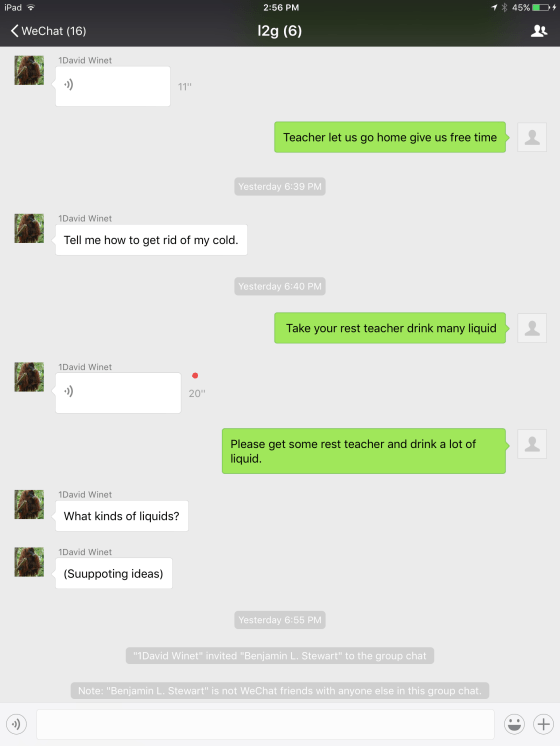
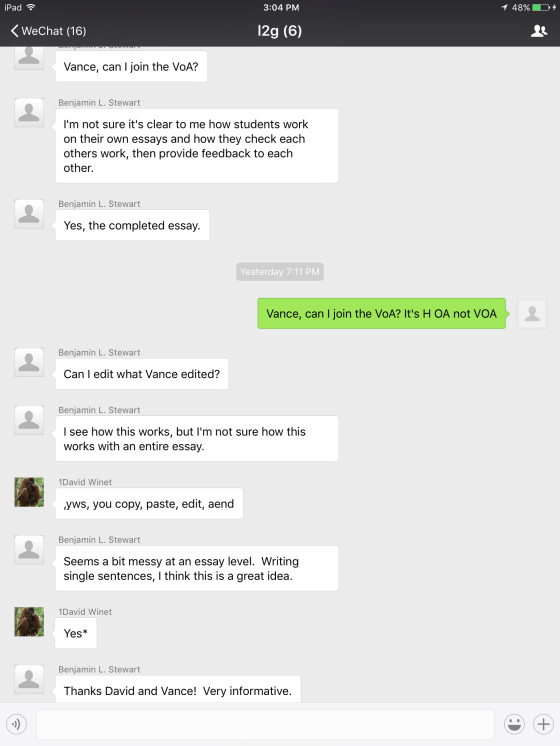
On Sunday, December 4, at 1400 UTC, David Winet connected with Learning2gether episode 354 to explain and discuss with us his latest publication in the On the Internet column of TESL-EJ on using Mobile Instant Messaging in the ESL Writing Class http://www.tesl-ej.org/wordpress/issues/volume20/ej79/ej79int/
I didn’t realize before now that YouTube/Live sends out an additional announcement on my Twitter feed; I guess that’s where I’m prompted for a message to accompany the video 🙂
Earlier this week
Learning2gether 353 – Mon Nov 28 1400 UTC Nellie Deutsch, Nives Torresi, Tom Hodgers, and Vance Stevens at MM9 – Panel on Badges: Choices and Options
Here are brief and a longer renditions of Dr. Costa’s lecture on Privacy
Long-time Webhead Dr. Cristina Costa streams another installment in one of the courses she teaches as Lecturer in Technology Enhanced Learning in the School of Education, Strathclyde University, https://www.strath.ac.uk/staff/costacristinadr/
Thu Dec 1 Globinar on Using a Single iPad in the Classroom
Sat Dec 3 Nikki Vradenburg: Featured Teacher on Classroom 2.0
Saturday, December 3, 2016 Nikki Vradenburg: Featured Teacher
We are so excited to have Nikki Vradenburg on Classroom 2.0 LIVE as a Featured Teacher for the month of December! Nikki teaches a grade 4/5 classroom in a K-8 rural school with 70 students in Bozeman, MT. This presentation is intended to showcase the wide variety of authentic products created by elementary students to share their learning. Participants will view examples of blog posts, screencasts, concept maps and audio recordings created by students in her classroom. Participants will learn basic principles for managing technology in the elementary classroom and will explore and analyze tools for creating authentic products with elementary students. Misconceptions about the limitations of young students using technology will be addressed as examples and explanations of student work are shared.
Nikki currently teaches fourth and fifth grade at LaMotte School in Bozeman, MT. She taught the K/1 class at her school for 12 years. She has been a classroom teacher since 2001 and has been at LaMotte since 2004. Before finding her place at LaMotte she taught for three years in Lake Havasu, Arizona. Nikki is a National Board certified teacher in the area of ELA Literacy. She is passionate about technology integration, especially blogging with students. Her classroom is a 1:1 Chromebook classroom and when she taught K1 they had 1:1 iPads. She is a BrainPOP certified teacher and a 2014 PBS Digital Innovator. She was named a finalist for the 2017 Montana teacher of the year. She delivers professional development to teachers all over the state of Montana in the areas of differentiation and technology integration and she recently presented at national education conferences NCCE in Seattle and ISTE in Denver in 2016. Nikki is a proud wife and mother, pet owner, reader and a writer. She loves camping, hiking and backpacking in the beautiful mountains of Montana where she has lived nearly all of her life.
Remember to follow us on Twitter: #liveclass20
More information and session details are at http://live.classroom20.com. If you’re new to the Classroom 2.0 LIVE! show you might want to spend a few minutes viewing the screencast on the homepage to learn how we use Blackboard Collaborate, and navigate the site. Each show begins at 12pm EST(Time Zone Conversion) and may be accessed in Blackboard Collaborate directly using the following Classroom 2.0 LIVE! link at http://tinyurl.com/cr20live. All webinars are closed captioned.
On the Classroom 2.0 LIVE! site (http://live.classroom20.com) you’ll find the recordings and Livebinder from our recent “Peekapak for Social Emotional Learning” session with Ami Shah. Click on the Archives and Resources tab.
Classroom 2.0 LIVE Team: Peggy George, Lorie Moffat, Tammy Moore, Paula Naugle, Steve Hargadon
On Monday, Nov 28, at 1400 UTC, Nellie Deutsch, Nives Torresi, Tom Hodgers, and Vance Stevens gathered at Moodle MOOC 9 to form a panel on Badges: Choices and Options to discuss how they use digital badges. This panel is conceived as a discussion on options for creating badges, what the criteria should be, and how they should be displayed in order to convey credibility and merit.
Here you can find the link to the WiZiQ recording, its YouTube and mp3 renditions, and slide presentation covering the badge creation and implementation tools Online Badge Maker, Open Badge Factory, Open Badge Passport, CanCred Passport, Salava, Mozilla Open Badges, Mozilla Backpack, Credly, creating badges in Moodle using Make Waves and Canva, and how badges are implemented in #evosession #evomc17 Minecraft MOOC.
On Sun Nov 20 1400 UTC Vance Stevens invited EVO2017 moderators to a post-training experiment with HoA through YouTube/Live
Learning2gether has been honing its streaming skills lately through practice with Minecraft + Discord and Bb Collaborate, but Episode 352 is the first time we have attempted something that used to be simple, streaming a HoA so that it would play as a YouTube/Live event. The audio was wonky until I went to a VPN, and there was no real agenda apart from just making it work, but the video here records stimulating conversation among participants, and the text transcript explains how it was set up and executed.
Near the bottom of this post, you’ll also find links to recordings made at the IATEFL / TESOL joint online conference held Earlier this Week.
What is this about?
I’ve never done this before since Google+ dropped HoA, but today I invited EVO2017 moderators or anyone interested to help me figure out how to set up and stream a live Hangout on Air using http://youtube.com/live by configuring encoders to stream to a pre-set event.
I can’t see how to do this with OBS (Open Broadcast Software) because the event I set in YouTube/Live did not require me to configure encoders (or maybe I didn’t see where I could configure them). However, XSplit encoder is set to my YouTube/Live account and knows I have an event scheduled, so I hope it will stream it.
The next challenge is to start the HoA. There is a Go Live Now button on my YouTube page for Learning2gether event #352 so I’m hoping when I click that, the HoA will start and when I activate XSplit it will stream it.
This is the theory. I have never actually done this before. However, I invited a few friends over to see if it might work (the people who show up here)
So what’s plan B? If I can’t get the HoA to stream through the event I scheduled as planned I should be able to start a HoA spontaneously and stream that. In that case I’ll have to communicate its new watch page here.
Either way I should be able get folks here into a HoA starting half an hour from now, and stream it either through the event I set up here https://plus.google.com/u/0/events/ctjksbdotdbnt1skdklj8kcqmu8 (perfect outcome) or through another watch page I create on the fly.
So, now with half an hour to go, it’s time to start the HoA (but not stream it)
About 20 minutes later …
Hi, uh oh, I hit GO LIVE NOW and no HoA started. What to do?? hmmm
nina.liakos
I’m here, do we have a link for the hoa yet?
Vance Stevens (lamely)
can anyone here figure out how to actually start a HoA? I’ve scheduled one but cannot figure out how to actually launch it
GOT IT
The one here https://youtu.be/BqdNzbT1yg0 is voice and whiteboard from the Bb Collaborate recording as rendered by the Elluminate Publish tool, which extracts video mp4, audio mp3, and text chat rtf from the link to the recording parked at Elluminate.com. Publish produces crisp video but without webcam or text chat enhancement.
The other recording is from the stream made at YouTube/Live using XSplit recorders. https://youtu.be/8mKXRtwTbCw
I noticed on first viewing this video, and others have noticed during streaming with XSplit, that it starts out in focus and then becomes blurry just a minute or two into the stream, as well as in the recording. XSplit is a freemium product which I am using because I’m not able to get OBS (Open Broadcasting Software) to stream to EVENTS set up in YouTube/Live. Now that I’ve had more experience with the nature of the tools necessary, I will revisit that, perhaps this Sunday, in an experimental HoA. I can set an event and know that I can get it to work with XSplit, but try at first to connect OBS, in case I can see what I was doing wrong.
(And this doesn’t work, as far as I can see, because when you set up an event, YouTube/Live does not prompt you to set up encoders, as it does if you want to stream right then. In the OBS interface you can stream to the key provided but I can’t see how it can detect events you have set up, as can XSplit, once you allow it to hack your YouTube/Live event information.)
At this moment, on reviewing the video recording, I don’t see this blurring. If I move my cursor through the unplayed frames, I see blurring in some distant frames, but this resolves itself in seconds as I hover over that frame. My suspicion initially was that XSplit was deliberately blurring the recording in order to push users into using the paid product, but now it appears that this might have been an artifact from the speed at which the video was processed onto YouTube. I’ll need to experiment further with both XSplit and OBS.
Learning2gether is not a fee-based endeavor, so I try to rely on free tools to the extent possible. There are expenses associated with Learning2gether; e.g. the WordPress site where this blog is kept requires a modest annual payment.
http://LearningTimes.org have long supported Webheads, from which L2g derives, with a grant allowing use of Bb Collaborate, which has been invaluable to us over the years.
This week I continue to learn what I can about streaming, and the only way to do that is to practice and see what happens. This is one of my purposes in attempting this experiment.
If the conference site should experience any difficulties, a back-up site with session calendars and links is at http://www.globaledcon.com.
Recordings of any sessions that have taken place will accessible on the conference recordings page, usually within a few minutes after a session has ended.
If you would like to connect with presenters and other GEC members you met at the conference, search our member directory and contact people through our GEC messaging system: http://www.globaleducationconference.com/profiles/members/
Our next initiative is the Great Global Project Challenge and Grant. The deadline is December 1 for listing a project. PreK-12 educators from non-profit schools are potentially eligible for a $1500 (US) grant opportunity through this program. Go to this site for more information: http://www.globalcollaborationday.org/the-great-global-project-challenge.html
Wed Nov 16 1300 UTC American English Webinar Series – Jeff Kuhn
and the times of the sessions 0800 and 1300 EDT are noon and 1700 UTC
Webinar Description:
In this webinar, we will investigate terminology associated with digital learning, and we will consider how to evaluate and select tech tools for the EFL classroom. We will then explore several digital tools teachers can use to support students, deliver content, and create engaging activities in both face-to-face and distance learning contexts. New to digital learning? No problem! Our presenter will share ideas and tools appropriate for teachers with all levels of experience in English Language Teaching.
Presenter bio:
Jeff Kuhn is a PhD candidate in the Educational Technology division of the Patton College of Education at Ohio University and instructor in the departments of both Linguistics and English. Jeff taught EFL in Japan and served in Peace Corps Mongolia as a teacher trainer before receiving his MA in Linguistics. He worked as a consultant on the U.S. Department of State’s Trace Effects, a video game for English language learners around the world. Jeff has presented on the use of games in the classroom at E-Tech Ohio, TESOL, and CALICO, His research interests include: Computer Assisted Language Learning (CALL), games and learning, second-language writing, and he is Batman in Minecraft.
The varieties of English used by different groups and/or in different parts of the world (including varieties used among second language users), representing local varieties, such as Indian English or Singaporean English, many developed in geographies influenced by a former history of colonialism.
A social construct of sense of self emerging through interaction, being shaped by experiences, contexts, and ideologies; cultural, political, and individual identities which they claim or which are assigned to them; a teacher’s own interpretation of how others see themselves and desirable ways to be seen by others. Day 2 Recorded Sessions from
A variety of digital and face-to-face professional development opportunities delivered by teachers associations, to meet the needs of the international English language professional. Professional development opportunities by teacher associations include, but are not limited to, practical workshops, up-to-date publications, and sound academic research.
The conference will use Adobe Connect to host this event and places are limited. Attendance on the day will be on a first come, first serve basis. Check the website for specific scheduling information.
Sat Nov 19 12pm EST Classroom 2.0 with Ami Shah on Peekapak for social emotional learning
Saturday, November 19, 2016
Peekapak for Social Emotional LearningSocial emotional learning is an important component in all classrooms and we are very pleased to have Ami Shah, one of the co-developers of Peekapak, with us to share an exciting new program for young learners. Peekapak is a freemium website created to help teach social-emotional learning topics such as respect, empathy, teamwork, courage, and optimism. At Peekapak they know that student success – both in academics and in life – starts with social-emotional learning. They have created a program that is designed for Pre-K to Grade 3 teachers. Developed by education experts, Peekapak’s innovative curriculum combines teaching skills like gratitude, empathy and self-regulation with Common Core reading and writing standards through engaging stories and fun lessons to be used in the classroom and in the home. Peekapak is currently being used by teachers across the US and in 70 countries around the world and they are committed to helping children become successful, compassionate, caring, and empathetic citizens of the world! Peekapak was a Grand Prize Winner of the It’s a Start Competition and was also funded on Kickstarter, hitting their target in 5 days which is an indication that many people were interested in a program like this!Ami Shah has earned a MBA from INSEAD, and has gained extensive marketing experience through roles at Procter & Gamble, and most recently, as Director of Retail Marketing at a consumer products start-up. Ami is passionate about improving youth education, and has previously advised, volunteered and taught children at education-related non-profit organizations, schools and start-ups. She is a mentor at Founder Institute Toronto (a startup launch program for talented entrepreneurs.Remember to follow us on Twitter: #liveclass20More information and session details are at http://live.classroom20.com. If you’re new to the Classroom 2.0 LIVE! show you might want to spend a few minutes viewing the screencast on the homepage to learn how we use Blackboard Collaborate, and navigate the site. Each show begins at 12pm EST (Time Zone Conversion) and may be accessed in Blackboard Collaborate directly using the following Classroom 2.0 LIVE! link at http://tinyurl.com/cr20live. All webinars are closed captioned.On the Classroom 2.0 LIVE! site (http://live.classroom20.com) you’ll find the recordings and Livebinder from our recent “Hour of Code and Beyond” session with Sam Patterson. Click on the Archives and Resources tab.
Classroom 2.0 LIVE Team: Peggy George, Lorie Moffat, Tammy Moore, Paula Naugle, Steve Hargadon
On Sunday November 13, 2016, at the sweet-spot hour of 1400 UTC, EVO2017 moderators-in-training held their wrap up with an event billed as a “Celebration of Moderator Voices”.
About this event
All EVO2017 moderators were invited to join us in chat in Bb Collaborate to share our experiences with this year’s round of EVO Moderator acculturation, show off their session spaces, and talk about what happens next.
Join us live or watch the stream / replay the recording here:
About the recordings
There are two video recordings here. The one at the top of the page is voice and whiteboard from the Bb Collaborate recording as rendered by the Elluminate Publish tool, which extracts video mp4, audio mp3, and text chat rtf from the link to the recording parked at Elluminate.com. The other recording, above, is from the stream made at YouTube/Live using XSplit recorders. I noticed on first viewing this video, and others have noticed during streaming with XSplit, that it starts out in focus and then becomes blurry just a minute or two into the recording. XSplit is a freemium product which I am using because I’m not able to get OBS (Open Broadcasting Software) to stream to EVENTS set up in YouTube/Live. Now that I’ve had more experience with the nature of the tools necessary, I will revisit that, perhaps this Sunday, in an experimental HoA. I can set an event and know that I can get it to work with XSplit, but try at first to connect OBS, in case I can see what I was doing wrong.
At this moment, on reviewing the video recording, I don’t see this blurring. If I move my cursor through the unplayed frames, I see blurring in some distant frames, but this resolves itself in seconds as I hover over that frame. My suspicion initially was that XSplit was deliberately blurring the recording in order to push users into using the paid product, but now it appears that this might have been an artifact from the speed at which the video was processed onto YouTube. I’ll need to experiment further with both XSplit and OBS.
Learning2gether is not a fee-based endeavor, so this is something I wish to avoid. There are expenses associated with Learning2gether. The WordPress site where this blog is kept requires a modest annual payment, and http://LearningTimes.org have long supported Webheads, from which L2g derives, with a grant allowing use of Bb Collaborate, which has been invaluable to us over the years.
In any event, I continue to learn what I can about streaming, and the only way to do that is to practice and see what happens. If you have any suggestions, I would welcome your comments here – Vance
Designers for Learning asks, “What impact will you make?” On Saturday, November 12th, join Designers for Learning during Education Impact Day, a free global online conversation with twelve featured speakers who will share their perspectives on educational impact, including past successes, current initiatives, and needed innovations. Each hour features a different invited speaker who will focus on a topic related to his or her expertise, including education policy, instructional design, digital media, and educational technology.
Excerpts, and a chronological lineup of the speakers
Heidi Silver-Pacuilla, U.S. Department of Education, Office of Career, Technical, and Adult Education
Heidi Silver-Pacuilla oversees the contracts delivering professional development, technical assistance, and program guidance funded with national leadership moneys allocated under the Adult Education and Family Literacy Act.
Robert L. Russell, Program Director, Education & Human Resources, National Science Foundation
A developmental psychologist by background, I have spent most of my career directing organizations or projects that engage students and the public in iSTEM or health in museum, community or media contexts.
Lisa Petrides, CEO and Founder of the Institute for the Study of Knowledge Management in Education (ISKME),
In 2007, she led the creation of OER Commons, a digital public library for OER and collaboration platform. She also produces ISKME’s flagship event dedicated to catalyzing education innovation, Big Ideas Fest.
Patti Constantakis, Director of Adult Learning Initiatives, Digital Promise
Her work focuses on spurring the use of technology in adult education by working with educators, researchers and entrepreneurs to create and implement quality digital learning opportunities for adult learners.
Ali Carr-Chellman, Dean of the College of Education & Professor of Curriculum and Instruction, University of Idaho
Her work focuses on diffusion of innovations, change management, gaming, gender, and cybercharter schooling. She has focused her recent work on boys and gaming to learn as well as public intellectualism in the field of Learning, Design & Technology.
Monica W. Tracey, Associate Professor of Learning Design and Technology, Wayne State University
Her teaching and research focuses on theory and design-based research of interdisciplinary design including design thinking, designer reflection and designer decision-making.
Drew Davidson, Director and Teaching Professor, Carnegie Mellon’s Entertainment Technology Center
Drew Davidson is a professor, producer and player of interactive media. He is interested in stories and transformational experiences across texts, comics, games and other media.
Paula Angela Escuadra, Head of Content Partnerships, Collective Shift
Paula Escuadra has a vested interest in using game-based learning and connected learning principles to help educators and mentors empower and inspire 21st century youth to become resilient systems thinkers who can save the planet and change the world (ask her about SimCityEDU and Battleground 538 on GlassLab Games!). Paula uses her years of experience from the video game industry to redesign conversations and action around local youth empowerment and global resilience.
Mizuko Ito, University of California, Irvine
Mizuko Ito is a cultural anthropologist of technology use, examining children and youth’s changing relationships to media and communications. In Japan, her research has focused on mobile and -portable technologies, and on gaming, digital media production, and Internet use.
Camille Dickson-Deane, Educational-Instructional Designer/Lecturer, Williams Centre for Learning Advancement Faculty of Business & Economics, The University of Melbourne, Australia
Dr. Camille Dickson-Deane focuses her research interests around the pedagogical usability of online learning environments and the process of designing innovative instructional solutions specifically for the online realm.
Jared Stein, Canvas by Instructure
I strive to help teachers enhance learning with technologies and practices that increase flexibility and improve outcomes. I look for creative, research-based solutions that make a measurable, positive impact on students, teachers, and organizations.
Eugene Kowch, Werklund School of Education, University of Calgary
Dr. Kowch believes strongly that educational technology scholars and practitioners are positioned to be the next generation of change leaders in the information age.
Logistics:
What: Free online webcast to explore educational impact with innovators in the field
When: Saturday, November 12th, 9:00 am – 9:00 pm EST
Sat Nov 12 1700 UTC Sam Patterson – Introducing Hour of Code Week Dec 5-11 – on Classroom 2.0
Saturday, November 12, 2016 Hour of Code and BeyondThe Hour of Code week will be here soon (Dec. 5-11, 2016) and we are thrilled to have Sam Patterson as our special guest to kick off our preparation for the Hour of Code week. He will share details about the Hour of Code and tips and resources you can use to get your classes involved in this exciting, life-changing experience as well as ways to move beyond the hour of code. He will share his passion for coding and programming with students as creators as well as consumers through their stories, and student examples and how to move from the Hour of Code to coding to learn. Sam is the author of Programming in the Primary grades: Beyond the Hour of Code, Poet, Writer, blogger, teacher of students: Sam has taught in independent schools since 2002 in the subjects of English, writing, darkroom photography, algebra, algebra 2, and pre-calc, K-5 technology, and making and tinkering. Sam is a innovator on campus and he uses his blog to reach out to his campus environment and to reach beyond into the community of connected educators.Remember to follow us on Twitter: #liveclass20More information and session details are at http://live.classroom20.com. If you’re new to the Classroom 2.0 LIVE! show you might want to spend a few minutes viewing the screencast on the homepage to learn how we use Blackboard Collaborate, and navigate the site. Each show begins at 12pm EST (Time Zone Conversion) and may be accessed in Blackboard Collaborate directly using the following Classroom 2.0 LIVE! link at http://tinyurl.com/cr20live. All webinars are closed captioned.On the Classroom 2.0 LIVE! site (http://live.classroom20.com) you’ll find the recordings and Livebinder from our recent “Becoming a Connected Educator” session with Craig Yen. Click on the Archives and Resources tab.Classroom 2.0 LIVE Team: Peggy George, Lorie Moffat, Tammy Moore, Paula Naugle, Steve Hargadon
On Sunday, Nov 6, 2016, at the usual time of 1400 UTC, EVO moderators and coordinators gathered to discuss how things were going over halfway through the annual training of EVO moderators for the coming year.
This is the streamed recording that was made in YouTube/Live
This week’s EVO Moderator Training discussion is on platforms, badges, and certificates. You can join live at http://webheads.learningtimesevents.org/ or catch the stream here, https://youtu.be/VrI7KjyCDHs. All sessions held in the Webheads virtual office are by definition open ones, so all are welcome to attend.
Vance explained to moderators how they could use the LearningTimes Bb Collaborate Webheads Virtual Office graciously provided for the past decade as a grant to Webheads in Action by the good folks at LearningTimes, http://learningtimes.com. The following slides (since expanded over what was shown in the Bb Collaborate session) show how to reserve the room, how to enter the room as a session moderator, how to record the session and make sure the recording is saved on the Elluminate servers, and finally how to find the recording and extract its share link.
Sat Nov 5 noon EDT Classroom 2.0 Live with Craig Yen – Becoming a connected educator
Saturday, November 5, 2016 Becoming a Connected EducatorAre you a teacher or administrator who has been reluctant to try using social media tools such as Twitter to connect with other educators? Have you wanted to expand your professional learning network but just didn’t know how? Often it’s because you haven’t seen how it can help you, and you don’t feel you have the time to learn with all of the many demands on your time. You aren’t alone. I guarantee that you won’t want to miss this webinar with our special guest, Craig Yen. Craig is a 5th grade teacher who teaches at Valle Verde Elementary in Berkeley, California. He is a fan of all things Edtech and enjoys learning from others and sharing this learning widely. No matter where you go on the internet (or even f2f) you will find him participating and sharing constantly with others, whether it is in EdCamps, webinars, Google Hangouts, Twitter chats, #coffeeEDUs, #EduMatch, Mystery Skype calls, or at conferences such as CUE, ISTE and #notatiste. He is someone who is an awesome example of a teacher who has navigated this maze and has learned tools, tips and tricks to manage it with great success (and still keep his sanity)! Within this session, you will learn what it means to be a connected educator. Tips will be given on how to manage your Twitter stream and how and where to find people to connect with. He’ll also share examples of projects that will demonstrate how you can connect yourself and your students outside the classroom walls.Remember to follow us on Twitter: #liveclass20More information and session details are at http://live.classroom20.com. If you’re new to the Classroom 2.0 LIVE! show you might want to spend a few minutes viewing the screencast on the homepage to learn how we use Blackboard Collaborate, and navigate the site. Each show begins at 12pm EDT (Time Zone Conversion) and may be accessed in Blackboard Collaborate directly using the following Classroom 2.0 LIVE! link athttp://tinyurl.com/cr20live. All webinars are closed captioned.On the Classroom 2.0 LIVE! site (http://live.classroom20.com) you’ll find the recordings and Livebinder from our recent “Quantifying Student’s Progress with OrangeSlice Teacher Rubric” session with Matt Buchanan. Click on the Archives and Resources tab.Classroom 2.0 LIVE Team: Peggy George, Lorie Moffat, Tammy Moore, Paula Naugle, Steve Hargadon












 Learning2gether